

A lot of modern breaches don’t start with someone breaking in. They start with someone logging in, using a password that was phished, reused, or leaked.
Applications have moved to the cloud and people work from anywhere, so the office firewall no longer marks where “inside” ends. What decides access now is identity: who you are, how you proved it, and what you’re allowed to touch. That is why security teams call identity the new perimeter.
I’m an IAM intern, and I’ve spent my internship taking Keycloak, an open-source identity platform, apart. I set up realms and clients, traced logins step by step, and studied how CERN runs it as the single sign-on for roughly 14,000 services. This post is the map I wish I’d had on day one.
In about ten minutes you’ll learn:
the handful of concepts every identity system shares
how we got from LDAP and Kerberos to OAuth and OpenID Connect
why passkeys are replacing passwords
who the main identity providers are and how they differ
the newest problem in the field: giving AI agents an identity of their own
The core concepts, in plain terms
Identity systems answer four questions:
Identification: who do you claim to be? A username or an email.
Authentication (AuthN): can you prove it? A password, a passkey, a fingerprint.
Authorization (AuthZ): what are you allowed to do? Read this file, approve that payment.
Accounting: what did you actually do? Logs and audit trails.
Mixing up authentication and authorization is the most common beginner mistake. As we’ll see, that confusion is baked into the history of OAuth.
Two roles show up in every login flow. The Identity Provider (IdP) holds the accounts and verifies users. The Service Provider (SP), called a Relying Party (RP) in OpenID Connect, is the app that trusts the IdP’s answer instead of checking passwords itself.
That trust makes Single Sign-On (SSO) possible: log in once at the IdP, and every connected app accepts it. Federation stretches the same idea across organizations, so your company’s IdP can vouch for you inside a vendor’s product.
Accounts also have a lifecycle. Provisioning creates them when someone joins, and deprovisioning removes them when someone leaves. Forgotten accounts are a classic way in for attackers, so most organizations automate this with SCIM, a standard API for syncing users and groups between systems.
Finally, access models decide who gets what:
RBAC (role-based): permissions attach to roles such as “editor” or “billing admin.”
ABAC (attribute-based): rules look at attributes such as department, device, or time of day.
Least privilege: whichever model you pick, grant only what the job needs.
How we got here: a short history of identity protocols
Every protocol on this list exists because the one before it hit a wall.
Local accounts. At first, each system kept its own usernames and passwords. Ten systems meant ten passwords, and ten places to forget to delete an account.
Directories and tickets (1990s). LDAP gave an organization one central directory of users. Kerberos added tickets, so a user could prove who they were once and then reach many services. RADIUS did a similar job for network access such as VPN and Wi-Fi. All three assume you are inside a trusted corporate network. They still run underneath many enterprises today, most visibly in Active Directory.
Federation for the web (2005). Then applications moved into the browser and onto other companies’ servers. SAML 2.0 let an IdP hand a signed XML document, called an assertion, to an outside application through the browser. It was the first widely adopted answer to cross-company SSO, which is why so much enterprise software still speaks it. Three things made it stick. It needed nothing but a browser, so the two companies required no direct network link. It merged earlier competing efforts (SAML 1.1, Liberty Alliance ID-FF, and Shibboleth) into one standard. And a single assertion could carry the user’s attributes and roles along with the login.
The API era (2012). Mobile apps and APIs needed something lighter, plus a way to give an app limited access without handing over a password. OAuth 2.0 solved that with access tokens. Note what it is for: OAuth is about authorization. It tells an API what an app may do, not who the user is.
An identity layer (2014). Developers used OAuth for login anyway, each in a slightly different way. OpenID Connect (OIDC) standardized it by adding an ID token on top of OAuth 2.0.
Hardening (2015 to today). PKCE closed a hole that let attackers intercept authorization codes. A decade of similar lessons is collected in the OAuth 2.0 Security Best Current Practice and is being folded into OAuth 2.1, which is still an IETF draft. OAuth 2.1 is not a new protocol. It makes PKCE mandatory and removes the risky implicit and password grants.
For tokens, the same best practices come down to four habits:
One audience, smallest scope. An access token should work at a single API and carry only the permissions the task needs.
Bound to the client. Tie the token to the app that received it, using DPoP or mutual TLS, so a stolen copy is useless.
Rotating refresh tokens. Apps that cannot keep a secret, such as mobile and single-page apps, get a new refresh token on every use, unless the token is bound to the client.
No tokens in URLs. URLs leak through browser history, logs, and referrer headers.
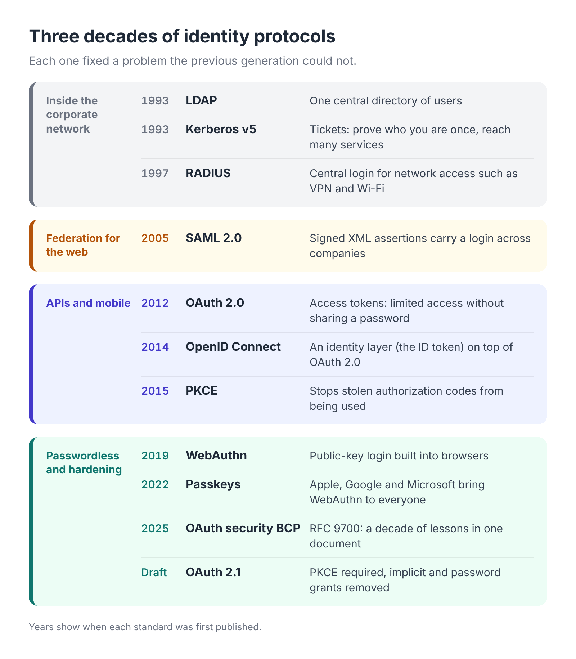
Three decades of identity protocols, from directories inside the network to tokens on the open web.
The protocols you’ll actually meet
In day-to-day work, three names cover almost everything: SAML, OAuth 2.0, and OpenID Connect.
SAML or OIDC?
Both solve login and SSO, so the application usually decides for you:
A new web, mobile, or single-page app: use OIDC. It is JSON-based and works naturally with APIs.
An older enterprise system or a SaaS product that only speaks SAML: use SAML.
A good IdP handles both at once. In Keycloak, one realm can serve a new portal over OIDC and an old HR system over SAML, and the user still logs in only once.
OAuth 2.0 grant types
A grant type is simply the way an app obtains a token. Three are worth knowing:
Authorization code with PKCE: a person logs in through the browser. This is the default for web, mobile, and single-page apps.
Client credentials: no person is involved. One service calls another using its own identity.
Device flow (RFC 8628): for smart TVs and command-line tools. You approve the login on your phone.
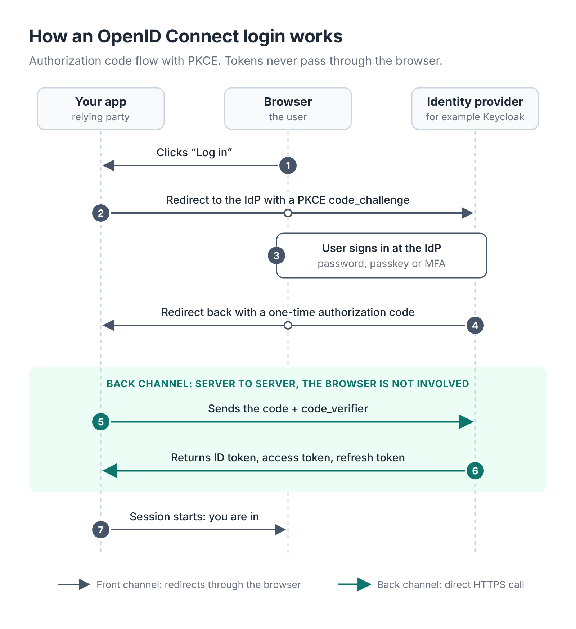
An OIDC login with the authorization code flow and PKCE. Tokens travel only over the direct server-to-server call, never through the browser.
Three tokens, one hotel
Think of the IdP as a hotel reception desk:
ID token: your passport. It tells the app who you are, and it is never sent to an API.
Access token: your room key card. The app presents it to the API on every request. It is short-lived on purpose: Keycloak’s default is five minutes.
Refresh token: lets the app get a new key card without sending you back to reception.
Most of these are JWTs (RFC 7519): three Base64URL-encoded parts in the form header.payload.signature. One detail worth remembering is that a JWT is signed, not encrypted. Anyone who holds it can read it, so secrets never belong inside one.
Authentication: from passwords to passkeys
Passwords are a shared secret. You know it, and the server stores a copy of it in hashed form. That is the root problem: shared secrets get reused across sites, typed into fake login pages, and leaked when a server is breached.
Multi-factor authentication (MFA) adds a second proof:
One-time codes from SMS or an authenticator app. Better than a password alone, but a fake site can ask for the code too and relay it in real time.
Push notifications. Convenient, but attackers can spam prompts until a tired user taps Approve.
Hardware security keys. The strongest of the three, because the key checks which site it is talking to.
Passkeys take that last idea and make it mainstream. This is passwordless sign-in: there is no password to type, reuse, or steal. A passkey is a FIDO2 / WebAuthn credential built on public-key cryptography:
When you register, your device creates a key pair for that one website. The private key stays on your device, and the site receives only the public key.
When you sign in, the site sends a random challenge. You unlock the device with a fingerprint, your face, or a PIN, and the device signs the challenge.
The site checks the signature with the public key it already has.
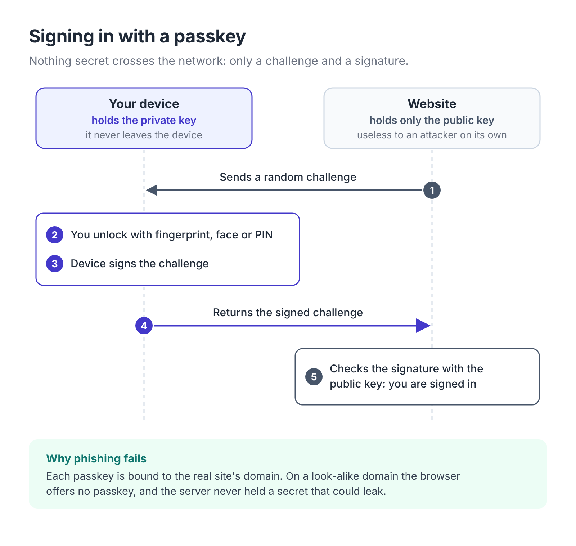
Signing in with a passkey. The private key and your fingerprint never leave the device.
This design resists phishing for two reasons. There is no shared secret to steal, because the server holds only a public key. And each passkey is bound to the real site’s domain, so the browser will not offer it to a look-alike site.
Passkeys come in two flavors. Synced passkeys are backed up and copied across your devices by Apple, Google, Microsoft, or a password manager, which makes recovery easy. Device-bound passkeys never leave one device, such as a hardware security key, and suit administrators and other high-risk accounts. The FIDO Alliance describes both as highly phishing resistant, with different trade-offs between assurance and recovery.
One more idea completes the picture: adaptive (risk-based) authentication. The IdP looks at context, such as a new device, an unusual location, or a sensitive action, and asks for stronger proof only when the risk is higher.
Who runs identity today
You rarely build an identity provider yourself. You pick one, and the main choices fall into two camps.
Hosted services run the IdP for you:
Microsoft Entra ID (formerly Azure AD): the natural choice wherever Microsoft 365 is already in use.
Okta: a vendor-neutral platform known for its large catalog of ready-made app integrations.
Auth0: owned by Okta since 2021 and aimed at developers who add customer login to their own apps.
Google Cloud Identity: identity for organizations built around Google Workspace and Google Cloud.
Amazon Cognito: customer sign-in for applications that live on AWS.
Ping Identity sits in between. It offers cloud services as well as software you run yourself, which suits large enterprises with hybrid or on-premises needs.
Self-managed means you run the software. Keycloak is the best-known open-source option and has been a CNCF incubating project since 2023. It is free, speaks OIDC, OAuth 2.0, and SAML 2.0, and can pass logins on to other identity providers. You can adapt it at three levels: configuration, themes, and code extensions.
The trade-off is control against effort. With a hosted service, someone else handles upgrades, uptime, and security patches, and you pay per user and accept the product’s limits. With Keycloak, you control the data and the behavior, but the database, the upgrades, and high availability become your job.
Protocols rarely decide the choice. All of these providers issue OpenID Connect and OAuth 2.0 tokens to your applications, and all of them work with SAML 2.0. Amazon Cognito is the partial exception: to your app it is an OpenID Connect provider, and it uses SAML only on the other side, to accept logins from an outside identity provider.
CERN shows how far the self-managed route can go. It runs three separate Keycloak installations for development, QA, and production, and keeps all of its production services in a single realm. There are roughly 14,000 of them, according to the July 2026 CERN presentation The Many Faces of Authentication and Authorisation at CERN (PDF). The lesson I took from that design: you do not need a separate realm for every team or application.
Running Keycloak myself taught me three practical things:
Inherited roles are hidden by default. A user’s Role mapping tab lists only directly assigned roles until you clear Hide inherited roles, so real permissions can be wider than they look.
One client, one protocol. A client speaks either OIDC or SAML. An application that needs both gets two clients.
SSO stops at the realm boundary. A session in one realm does not sign you in to another. That takes identity brokering, where one realm trusts the other as an identity provider.
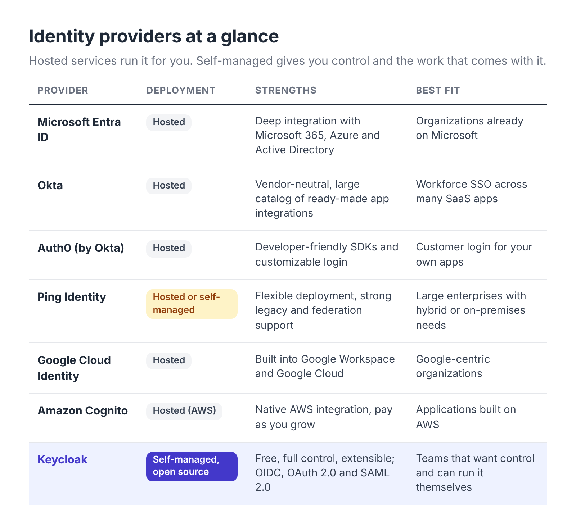
How the main identity providers compare at a glance.
Agentic identity: when the “user” is an AI agent
Everything so far assumes a person at a keyboard or a fixed backend service. AI agents break that assumption. An agent reads your email, opens tickets, and calls other agents, often for a person who is no longer watching.
Classic identity asks two questions: who are you, and what may you do? Agents add a third: on whose behalf are you acting?
Two modes
Autonomous. The agent acts as itself, like a nightly monitoring job. This is ordinary machine-to-machine identity: the client credentials grant, or a workload identity such as SPIFFE, which gives software a short-lived cryptographic identity instead of a static secret.
Delegated. The agent acts for a user. The wrong way to do this is impersonation: the agent uses the user’s own token, and every log entry looks as if the user did it. The right way is delegation, where the token names both the user and the agent.
Token exchange (RFC 8693) standardizes delegation with an act (actor) claim:
{
“sub”: “user@example.com“,
“aud”: “orders-api”,
“scope”: “orders:read”,
“act”: { “sub”: “shopping-agent” }
}
Read it as: “shopping-agent is acting for user@example.com, and may only read orders.”
The chain problem
Agents hand work to other agents: user → agent A → agent B → tool. Passing the same token down the chain is tempting and wrong. Every hop carries more permission than it needs, and one stolen token opens everything. The better pattern is a fresh token at every hop, with a narrower audience, fewer scopes, and a shorter lifetime.
Where the standards stand
None of today’s finished standards was written for agents. They are general building blocks, reused:
The MCP authorization specification treats an MCP server as an OAuth 2.1 resource server and the AI application as an OAuth 2.1 client. It also forbids token passthrough.
At the IETF, drafts on identity chaining across domains, transaction tokens, and workload identity (the WIMSE working group) are adapting OAuth to agent scenarios.
Vendors are moving too. Cross App Access, an open protocol first led by Okta, moves access decisions from individual users to the company’s identity provider. Microsoft Entra Agent ID gives each agent its own identity in the directory, which administrators govern with the same controls they use for people.
Open challenges
Accountability and auditing. When three agents and one human are in the chain, the logs must still show who did what.
Consent. Should each user click Allow, or should the company decide centrally?
Revocation. If a user withdraws permission mid-task, tokens already issued further down the chain keep working until they expire.
Nobody has a complete answer yet, which makes this the most interesting corner of identity to watch.
What to take away
Identity is the perimeter. Who you are and how you proved it now decides access, not which network you sit on.
Authentication and authorization are different jobs. OIDC answers “who is this?” and OAuth answers “what may this app do?”
Protocols pile up, they don’t disappear. LDAP, SAML, and OIDC often run side by side in the same company, and a good IdP translates between them.
Passkeys fix the weakest link. No shared secret means nothing worth phishing.
Agents are the next identity problem. The building blocks exist, but the rules for delegation, consent, and audit are still being written.
Where is this heading? Fewer passwords, shorter-lived tokens, and far more non-human identities than human ones. Identity is turning from a login page into the control plane for everything that touches your data, people and software alike.
Further reading
Thanks for reading. If one part of identity still confuses you, leave a comment and tell me which. It may become the next post.
